

Categories

db2top Sessions Screen (Part 1)

Illustration of various applications sessions

Today we will take our first detailed look at the Sessions screen. The sessions screen lets you view applications connected to the database and see what they’re doing and how many resources they are consuming.

You launch the Sessions screen by pressing the ‘l’ (lowercase ‘L’) key. When db2top is at its minimum width of 80 columns, the Sessions screen consists of a set of gauges at the top and a table at the bottom.

The gauges, as they appear in db2top, are shown below:
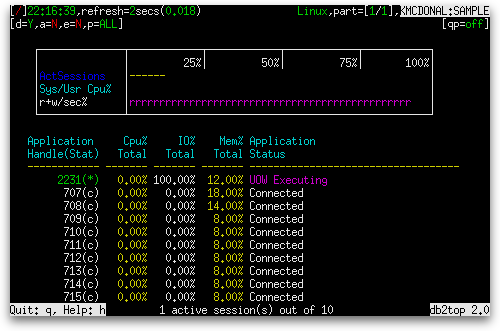
db2top Sessions screen at 80 columns wide

There are three gauges shown:

Gauge NameGauge TypeDefinition
ActSessionsNormalProportion of connections that are executing work. (rem_cons_in_exec + local_cons_in_exec) / (rem_cons_in + local_cons)
Sys/Usr Cpu%Avg Seconds

Width of sequence of 's' characters:
sum( agent_sys_cpu_time ) / average( sum( agent_usr_cpu_time ) + sum( agent_sys_cpu_time ) )

Width of sequence of 'u' characters:
sum( agent_usr_cpu_time ) / average( sum( agent_usr_cpu_time ) + sum( agent_sys_cpu_time ) )

where:
sum()
means summing across all agents
average()
means averaging over the samples taken since the last snapshot reset or database activation
r+w/sec% Avg Seconds

Width of sequence of 'r' characters:
sum( pool_data_l_reads + pool_index_l_reads + pool_temp_data_l_reads + pool_temp_index_l_reads ) / average( sum( pool_data_l_reads + pool_index_l_reads + pool_temp_data_l_reads + pool_temp_index_l_reads ) + sum( pool_data_writes + pool_index_writes ) )

Width of sequence of 'w' characters:
sum( pool_data_writes + pool_index_writes ) / average( sum( pool_data_l_reads + pool_index_l_reads + pool_temp_data_l_reads + pool_temp_index_l_reads ) + sum( pool_data_writes + pool_index_writes ) )

where:
sum()
means summing across all agents
average()
means averaging over the samples taken since the last snapshot reset or database activation

The table below the gauges has the following columns, grouped into sets large enough to fit a small screen:

db2top Sessions screen columns 1 to 5

Column NameDefinition
Application Handle(Stat) A system-wide unique ID for the application (agent_id), together with a short code for the current status of the application (appl_status) in parentheses. Possible values for the status are:
c
Database Connect Completed (SQLM_CONNECTED) or
Database Connect Pending (SQLM_CONNECTPEND)
*
Unit of Work Executing (SQLM_UOWEXEC),
Pending remote request (SQLM_WAITFOR_REMOTE), or
Federated request pending (SQLM_REMOTE_RQST)
i
Unit of Work waiting (SQLM_UOWWAIT)
l
Lock Wait (SQLM_LOCKWAIT)
L
Data Fast Load (SQLM_LOAD)
?
All other states
Cpu% Total

This session's statement CPU time as a percentage of the total statement CPU time of all sessions

(stmt_usr_cpu_time + stmt_sys_cpu_time) / sum(stmt_usr_cpu_time + stmt_sys_cpu_time) * 100%, where sum() means summed across all sessions. A sliding window is used to measure only the last x samples, where x is a number between 1 and 30 that the user can control using the '+' and '-' keys.

IO% Total
Delta mode:
This session's percentage of buffer pool logical reads and physical writes as a percentage of the total buffer pool logical reads and physical writes for all sessions, measured during the last interval.
Actual mode:
This session's percentage of buffer pool logical reads and physical writes as a percentage of the total buffer pool logical reads and physical writes for all sessions, measured since the last snapshot reset of database activation.
( pool_data_l_reads + pool_index_l_reads + pool_temp_data_l_reads + pool_temp_index_l_reads + pool_data_writes + pool_index_writes ) / sum( pool_data_l_reads + pool_index_l_reads + pool_temp_data_l_reads + pool_temp_index_l_reads + pool_data_writes + pool_index_writes ) * 100%
Mem% Total The current size of this session's memory pool as a percentage of the size of all sessions' memory pools combined. pool_cur_size × 100% / sum( pool_cur_size ) where sum() means summing across all sessions
Application Status The current status of the application (appl_status). Possible values are:
  • Initializing (SQLM_INIT)
  • Connect Pending (SQLM_CONNECTPEND)
  • Connected (SQLM_CONNECTED)
  • UOW Executing (SQLM_UOWEXEC)
  • UOW Waiting in the application (SQLM_UOWWAIT)
  • Lock Waiting (SQLM_LOCKWAIT)
  • Commit Active (SQLM_COMMIT_ACT)
  • Rollback Active (SQLM_ROLLBACK_ACT)
  • Recompiling Plan (SQLM_RECOMP)
  • Compiling SQL Stmt (SQLM_COMP)
  • Request Interupted (SQLM_INTR)
  • Disconnect Pending (SQLM_DISCONNECTPEND)
  • Prepared Transaction (SQLM_TPREP)
  • Trans. heuristically committed (SQLM_THCOMT)
  • Trans. heuristically aborted (SQLM_THABRT)
  • Transaction ended (SQLM_TEND)
  • Creating Database (SQLM_CREATE_DB)
  • Restarting Database (SQLM_RESTART)
  • Restoring Database (SQLM_RESTORE)
  • Backing Up Database (SQLM_BACKUP)
  • Loading Database (SQLM_LOAD)
  • Unloading Database (SQLM_UNLOAD)
  • I/O Error Waiting (SQLM_IOERROR_WAIT)
  • Quiescing a Tablespace (SQLM_QUIESCE_TABLESPACE)
  • Waiting for remote node (SQLM_WAITFOR_REMOTE)
  • Pending results from remote request (SQLM_REMOTE_RQST)
  • Decoupled from coordinator (SQLM_DECOUPLED)
  • Rollback to savepoint (SQLM_ROLLBACK_TO_SAVEPOINT)
  • Unknown[x] where x is the value of an SQLM constant

If a rollback is in progress, its progress ( progress_completed_units × 100% / progress_total_units ) is shown and the color is red.

If the status short code from the Application Handle column is '*', the color is magenta.

If the status short code from the Application Handle column is 'l', the color is red.

db2top Sessions screen columns 6 to 10

Column NameDefinition
Application NameThe name of the application (appl_name) running at the client, as known to the database or DB2® Connect™ server.
Delta mode:
Delta RowsRead/s
Actual mode:
Actual RowsRead
Delta mode:
The number of rows read (rows_read) per second from tables in this session during the interval.
Actual mode:
The number of rows read (rows_read) from tables in this session since the last snapshot reset or database activation.
Delta mode:
Delta RowsWritten/s
Actual mode:
Actual RowsWritten
Delta mode:
The number of rows changed (inserted, deleted or updated) per second in tables in this session (rows_written) during the interval.
Actual mode:
The number of rows changed (inserted, deleted or updated) in tables in this session (rows_written) since the last snapshot reset or database activation.
Delta mode:
Delta IOReads/s
Actual mode:
Actual IOReads
Delta mode:
The number of buffer pool logical reads performed per second for the session during the interval.
Actual mode:
The number of buffer pool logical reads performed for the session since the last snapshot reset or database activation.
pool_data_l_reads + pool_index_l_reads + pool_temp_data_l_reads + pool_temp_index_l_reads
Delta mode:
Delta IOWrites/s
Actual mode:
Actual IOWrites
Delta mode:
The number of physical writes performed per second for the session during the interval.
Actual mode:
The number of physical writes performed for the session since the last snapshot reset or database activation.
pool_data_writes + pool_index_writes

db2top Sessions screen columns 11 to 18

Column NameDefinition
Delta mode:
Delta TQr+w/s
Actual mode:
Actual TQr+w
Delta mode:
Total number of rows read from or written to table queues per second for the session during the interval.
Actual mode:
Total number of rows read from or written to table queues for the session since the last snapshot reset or database activation.
tq_rows_read + tq_rows_written
Sess Memory The current size of the session's memory pool (pool_cur_size).
Assoc. Agents The number of subagents associated with the application (num_assoc_agents).
Paral. DegreeThe degree of parallelism requested when the query was bound (degree_parallelism).
Lockwait (sec)The total elapsed time in seconds spent waiting for locks. lock_wait_time / 1000
Locks HeldThe number of locks currently held (locks_held)
Sorts (sec)The total elapsed time in seconds for all sorts that have been executed. total_sort_time / 1000
Log UsedThe amount of log space (in bytes) used in the current unit of work of the monitored application (uow_log_space_used).

db2top Sessions screen columns 19 to 25

Column NameDefinition
Delta mode:
Delta RowsSelect/s
Actual mode:
Actual RowsSelect
Delta mode:
The number of rows that have been selected and returned to the application per second during the interval (rows_selected).
Actual mode:
The number of rows that have been selected and returned to the application since the last snapshot reset or database activation (rows_selected).
Fetch Count(Stmt)
Delta mode:
The number of successful physical fetches during the interval (fetch_count).
Actual mode:
The number of successful physical fetches since the last snapshot reset or database activation (fetch_count).
Dynamic SQLThe number of dynamic SQL statements that were attempted (dynamic_sql_stmts).
Static SQLThe number of static SQL statements that were attempted (static_sql_stmts).
#of XQueriesThe number of XQuery statements executed for an application or database (xquery_stmts)
Os UserThe ID that the user specified when logging in to the operating system. This ID is distinct from auth_id, which the user specifies when connecting to the database (execution_id). When the execution_id is not available, the name of the database manager instance is shown instead (server_instance_name).
DB UserThe authorization ID of the user who invoked the application that is being monitored (auth_id). When the auth_id is not available, the name of the database manager instance is shown instead (server_instance_name).

db2top Sessions screen columns 26 to 32

Column NameDefinition
Client NetNameThe nname in the database manager configuration file at the client database partition. This element only applies to Windows Environments where the NetBIOS LAN environment exists.
Client PlatformThe operating system on which the client application is running (client_platform).
StatusChTimeThe date and time the application entered its current status (status_change_time).
Time InStatusThe amount of time spent so far in the current state (time of most recent snapshot - status_change_time).
IoType (Data/Index/Temp)An in-table gauge showing the proportion of total reads that are logical data reads, logical index reads, and logical temporary reads. Data reads (pool_data_l_reads) are shown by a sequence of 'd' characters, index reads (pool_index_l_reads) by a sequence of 'i' characters, and temporary reads (pool_temp_data_l_reads + pool_temp_index_l_reads) by a sequence of 't' characters.
Delta mode:
Reads are measured for the interval.
Actual mode:
Reads are measured from the last snapshot reset or database activation.
Sorts OverflowsThe total number of sorts that ran out of sort heap and may have required disk space for temporary storage (sort_overflows).
Hash Join OverflowsThe number of times that hash join data exceeded the available sort heap space (hash_join_overflows)

db2top Sessions screen columns 33 to 40

Column NameDefinition
Client PidThe process ID of the client application that made the connection to the database (client_pid).
Node NumberThe number assigned to the node in the db2nodes.cfg file (node_number).
Last OperationThe statement operation currently being processed or most recently processed, if none currently running (stmt_type)
TimeTo ConnectThe time it took for this session's connection to be established (conn_complete_time - appl_con_time).
Session CpuThe total system and user CPU time used by the database manager agent process (usr_cpu_time + sys_cpu_time).
Statement CpuThe total user and system CPU time used by the currently executing statement (stmt_usr_cpu_time + stmt_sys_cpu_time).
Max Cost EstimateThe most recent estimated cost of a query in the current transaction of the session, as determined by the SQL compiler (query_cost_estimate).
Recent Cpu[1 to 30] This session's statement CPU time (stmt_usr_cpu_time + stmt_sys_cpu_time). A sliding window is used to measure only the last x samples, where x is a number between 1 and 30 that the user can control using the '+' and '-' keys.

So that covers what information is available on small screens of 80 to 140 columns wide. In the next post, we’ll see what additional information becomes available on wider screens.

Popularity: unranked [?]

Feed icon Subscribe by RSS!
  • Share/Bookmark

Related posts:

  1. db2top Database Screen (Part 2) In the first post of this series on the...
  2. db2top -k Some of the information that db2top reports are statistics measured...
  3. db2top Feature of the Day – Gauges Before we can examine the various interactive screens of...
  4. db2top Feature of the Day – Command Line Options (Summary) Now that we have reviewed each command line option individually,...
  5. db2top -d and db2top -h Today, I’m going to start writing about db2top command line...

Related posts brought to you by Yet Another Related Posts Plugin.

View Commentsdb2top Sessions Screen (Part 1)

  • Juan Guillen

    Great work!! This is the best documentation I've found so far on db2top. Keep up the good job

  • thekguy

    Hi Juan,

    Thanks for your kind words. Comments like yours keep me motivated to continue this series. Are there any topics you would like to see me cover in the future?

  • [...] start by examining a screen containing a table: the Sessions screen. By default, the Sessions screen is sorted by the Cpu% Total column in ascending order. You can [...]

Leave a Reply


You can use these HTML tags

<a href="" title=""> <abbr title=""> <acronym title=""> <b> <blockquote cite=""> <cite> <code> <del datetime=""> <em> <i> <q cite=""> <strike> <strong>

blog comments powered by Disqus




