The -b option allows you to run db2top in “background mode”. In today’s post, we will examine what it means to run db2top in background mode and sample the various sub-options that let you customize background mode to your liking.
In background mode, instead of launching the usual text-based graphical user interface, db2top simply prints output to the console or to a file, depending on the sub-options you specify, and there are a lot of sub-options. First are all the different reports you can print:
- d = database
- l = sessions
- t = table spaces
- b = bufferpools
- T = tables
- D = dynamic SQL
- s = statements
- U = locks
- u = utilities
- F = federation
- m = memory
You can specify only one of the above sub-options and it must be placed immediately after the -b. Specifying more than one option results in:
*************************************************************************
*** ***
*** Error: Multiple suboptions in background mode are not supported ***
*** ***
*************************************************************************
Failing to specify the sub-option immediately after the -b results in:
*************************************************************************
*** ***
*** Error: -b requires a valid suboption ***
*** ***
*************************************************************************
Specifying the -b more than once results in:
*************************************************************************
*** ***
*** Error: -b can only be invoked once ***
*** ***
*************************************************************************
In addition to a choice of one of the report options listed above, the -b option has six optional sub-options that you can specify in any order. These are:
- -s = Max # of samples for -b option
- -D = Delimiter for -b option
- -o = Output file for background mode
- -X = XML Output
- -L = Write queries to ALL.sql
- -A = Performance analysis
Although in terms of the order in which they are specified on the command line they can come before or after -b option, specifying any one of these sub-options without also specifying -b results in an error message like the following for -X:
*************************************************************************
*** ***
*** Error: -X is only supported with the -b option ***
*** ***
*************************************************************************
or the following for -o file.out:
*************************************************************************
*** ***
*** Error: -o file.out is only valid for background mode ***
*** ***
*************************************************************************
Let’s look at each of the optional sub-options in turn:
- The -s sub-option takes an argument that specifies the number of samples to collect before terminating db2top. It can be used in combination with any of the other four sub-options.
- The -D sub-option takes an argument that specifies a character to be used to separate one column of data from another. The default that is used when -D is not specified is the “;” character. The -D sub-option can be used in combination with any of the other four sub-options, though -X, -L, and -A do not use delimiters, causing the -D option to have no effect when used in such combinations. For example, say you do not specify the -D sub-option as in the following:
db2top -d sample -b U -s 0
DB2 inactive: 40Y.25d 04h:34m:45s
Time;Agent_Id(State);Application_Name;Application_Status;Object_Name;
Lock_Mode;Object_Type;Lock_Status;Lock_Count;Is_Blocker;
Locked_By;Tablespace_Name
Exiting because of max samples reached(0), time since begin of collection=0 sec(s).If instead, you specify the -D option, the separator in the output changes as below:
db2top -d sample -b U -s 0 -D @
DB2 inactive: 40Y.25d 04h:41m:54s
Time@Agent_Id(State)@Application_Name@Application_Status@Object_Name
@Lock_Mode@Object_Type@Lock_Status@Lock_Count@Is_Blocker
@Locked_By@Tablespace_Name
Exiting because of max samples reached(0), time since begin of collection=0 sec(s).
- The -o sub-option takes an argument that specifies the name of a file where the output of db2top is to be written. If you specify a file that already exists, it will be overwritten, assuming the user invoking db2top has write permission to the file, otherwise a “Permission denied” message will be displayed. The -o option can be used with any other option.
- The -X sub-option takes no arguments and causes the data to be written out as an XML document. It cannot be used in combination with the -A sub-option. The first example above with the -X option appended produces the following output:
db2top -d sample -b U -s 0 -X
DB2 inactive: 40Y.25d 04h:52m:54s
<?xml version="1.0"?>
<Snapshot_stream database="sample">
<Locks_List time="23:52:54">
</Locks_List></Snapshot_stream>
- The -L sub-option writes any SQL statements that are executing at the time a snapshot is taken to a file named ALL.sql in the directory where you launched db2top. If the file already exists, the new statements are appended to the end of the file. Any statements that start and finish between one snapshot and the next would not be captured. It can be used in combination with any of the other sub-options. It puts a semicolon at the end of each statement and writes a timestamp inside comment delimiters (/* */) before each statement, like this:
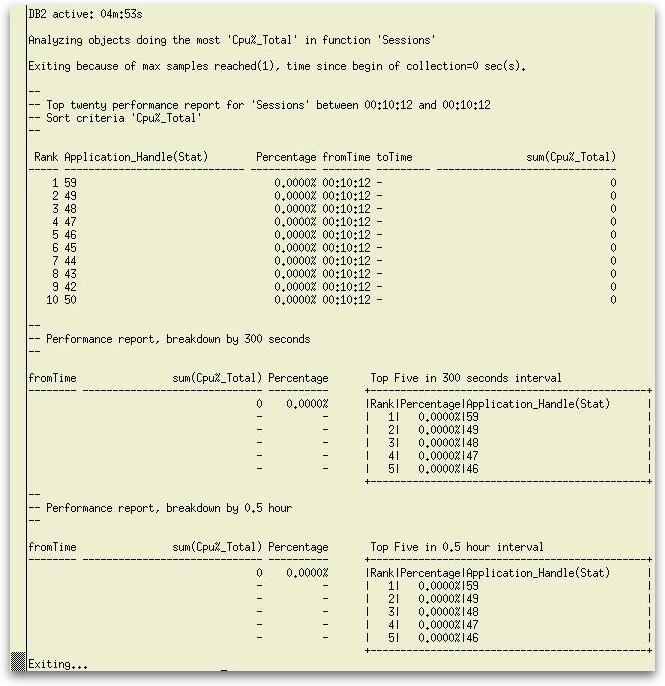
- The -A sub-option takes no arguments and causes a performance analysis to be performed on the data with the results of the analysis reported instead of the raw data. As mentioned above, it cannot be used in combination with the -X sub-option. For an example, we will use the sessions sub-option with a sample size of 1 with the following result:
/* 08:53:44.512548 */ select count(*) from syscat.views,syscat.views,syscat.views;
/* 08:53:48.700508 */ select count(*) from syscat.views,syscat.views,syscat.views;